iPhone · TestFlight
A real incoming call, on cue, with someone on the other end
The date is not going well and you need a reason to leave. Ruse rings your iPhone like any other call, with the phone locked or the app closed. Answer it and there is someone there. You talk, it talks back, and the person across the table hears both sides of a call.
Try Ruse on TestFlightSee how it works →
iPhone only. No account, no sign up.
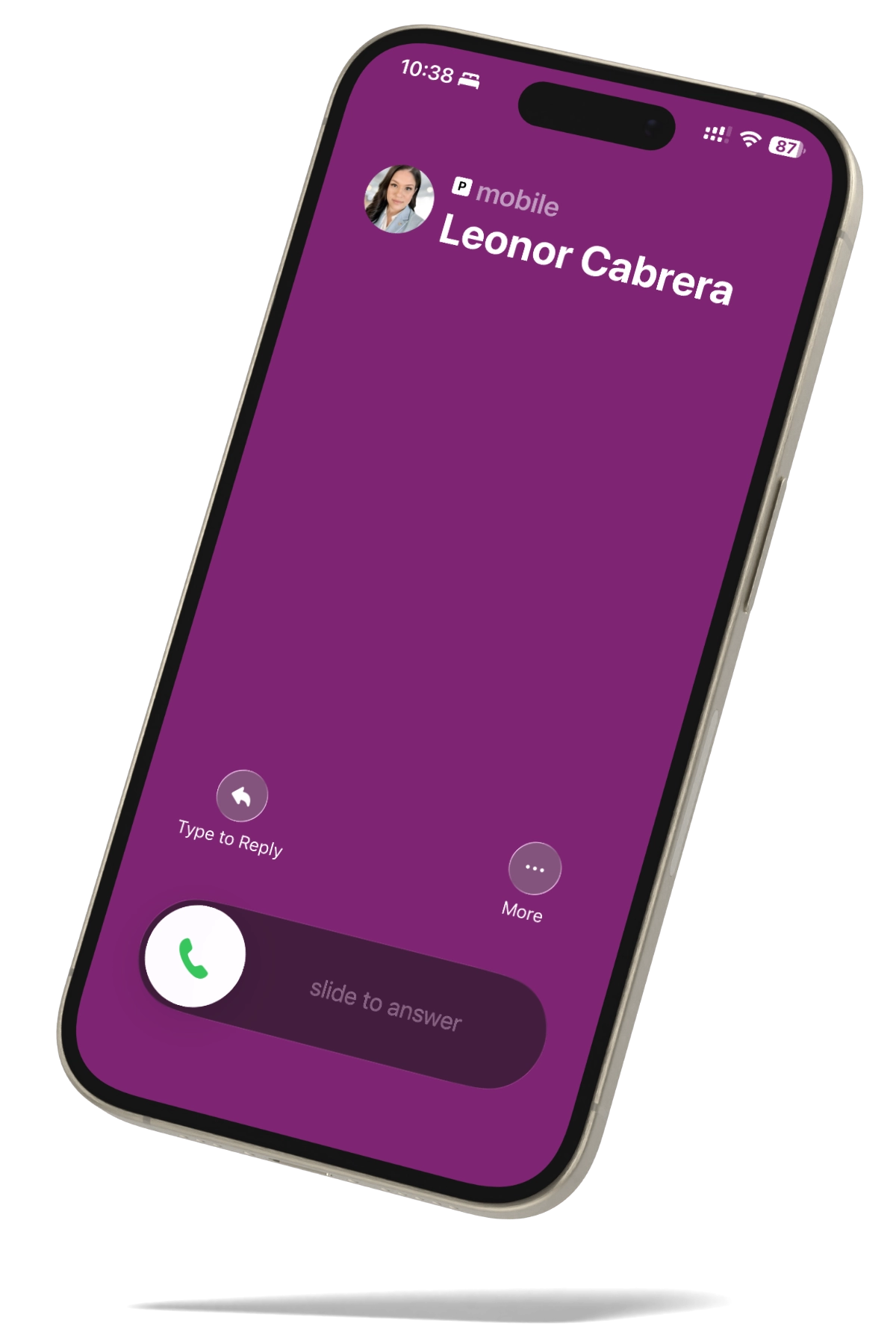
Rings on the lock screen
Around 45 seconds
No number, no sign up
The situation
For the moment you need to leave
Some situations do not come with a graceful door. A phone call is the one interruption nobody questions.

A date that is going wrong
You want to leave early, without a scene and without an explanation you have to invent on the spot.

A meeting that will not end
Your phone rings, you step outside to take it, and you do not come back.

A shoot or a rehearsal
A call that arrives exactly on cue, instead of waiting on someone off set to remember to dial.
How it works
Three steps, set up once
It is the real call screen, not a popup. Ruse uses the same iOS system that apps like WhatsApp and Skype use to show their calls, so it appears on the lock screen and behaves like any other incoming call.
Screenshot — create a contact
01
Design the contact
Choose who is calling, what they sound like, and why they are calling. The reason is a free text field, so it can be a work emergency, a friend outside, or whatever fits the room you are in. Add a line from the audio library or record it in your own voice.
Screenshot — triggers
02
Trigger it
Start it from the app, set it on a timer, or start it without touching the screen with Back Tap, Siri or a Shortcut. Siri can also schedule it: ask for a call in 1, 3, 5, 10 or 20 minutes.
Screenshot — incoming call
03
Answer it
It rings with the phone locked or the app closed, with the system ringtone, on the real call screen.
The difference
Answer it and someone talks back
The ring is the easy part. What sells it is the thirty seconds after you pick up. Ruse holds a live conversation: you speak, it answers, and the person next to you hears both sides of a call instead of a voice playing at you.
SamHey, are you still out? Something came up here.
YouWait, slow down. What happened?
SamNothing terrible, but I need you here. How soon can you get away?
YouGive me ten minutes.
You can interrupt it
Talk while it is talking and it stops, the way a real call works.
It ends itself
Around 45 seconds, so you are not left standing there holding a call that will not finish.
You are never reading a script
The conversation is built around the reason you wrote, in the moment.
The boundary
Ruse only ever calls you
There is no phone number anywhere in Ruse. Nothing dials, no carrier, no SIM. The app asks iOS to draw an incoming call on your own phone, which is exactly why it cannot place a call to anybody else. Ruse is built to get you out of a room, not to reach another person’s phone.
Outbound capability
Phone number None
Carrier None
SIM None
Calls placed 0

Discretion
Nobody sees you start it
Trigger it with Back Tap, Siri or a Shortcut. The app does not appear on screen when you start it this way.
Cancel it blind
An exit can buzz before it rings. During that window, repeat the trigger to cancel it. Two short buzzes confirm the cancellation, so you can tell cancelled from launched without looking at your phone.
Back Tap can misfire
It is read by the accelerometer. If that happens, switch it to a triple tap in Settings > Accessibility > Touch > Back Tap.
Ways to start it
Back Tap No screen
Siri No screen
Shortcut No screen
Timer Scheduled
Reliability & privacy
If something fails, it still rings
No connection, no live session, service having a bad day: the call still arrives and plays the audio you saved, or stays quiet with dignity. It does not leave you holding a dead call.
Setup ends with a real ring
The first time you see the call screen is not the day you need it.
No sign up
There is no login screen and nothing to create.
Your exits stay on your iPhone
Contacts, reasons and audio live on the device.
Recorded audio never leaves
Recorded and library audio play locally. The live conversation is the exception: that audio has to travel to reach the model that answers you.
The microphone, twice
Used for two things only: recording in your own voice, and the live conversation.
Read the detail
Everything we do and do not receive is set out in full in the privacy policy.
Pricing
Free to keep, paid to automate
There are no credits and no packs to run out of halfway through a situation. Subscriptions renew automatically at the price and period shown until you cancel in your Apple account settings.
Free
Free forever
$0no account, no expiry
The manual trigger from the app, unlimited saved exits, the full audio library, and recording the audio in your own voice. The manual trigger is never checked against a subscription, so the app still works on day 200 for someone who never paid.
Subscription
Exits
$1.99per month, or $17.99 per year
Scheduling, the insistence pattern that keeps ringing when the phone is put away, discreet triggers, and AI written custom audio, up to 10 a day.
The one that talks back
Exits + AI
$4.99per month, or $29.99 per year
Everything in Exits, plus the live conversation.
Questions
Questions people ask first
Does it ring with the phone locked or the app closed?
Yes. Ruse uses the iOS calling system, so a scheduled or triggered call rings on the lock screen with the system ringtone, whether or not the app is open.
Can Ruse call somebody else?
No. There is no phone number in the app and nothing to dial. Ruse can only ring the phone it is installed on.
Do I need an account?
No. There is no sign up and no login screen.
What happens if I have no signal?
The call still rings and plays the audio you saved. The live conversation is the one part that needs a connection.
How long does the call last?
Around 45 seconds. It ends on its own.
Which devices does it work on?
iPhone. There is no iPad version and no web version.
What languages does it work in?
The interface is available in 23 languages. The language of an individual exit is set separately, so a call can come in English while your phone is in Spanish.
What does it cost?
Ruse is free to install and free to use manually. Exits is $1.99 a month or $17.99 a year. Exits + AI, which adds the live conversation, is $4.99 a month or $29.99 a year.
At a glance
Device iPhone
Account None
Call length ~45 s
Interface languages 23
Rings without a connection Yes
Live conversation offline No
Set it up before you need it
Two minutes now, and the next time a room gets uncomfortable your phone already knows what to do.